Tech

Review: Today’s Plan

By BikeHubCoreAdmin · 80 comments

Today’s Plan seeks to bring the knowledge of a qualified coach to an affordable, cloud-based training and coaching subscription service in the form of training programs. What sets Today’s Plan apart from other off the shelf programs is that it responds and adapts to your feedback and training results.

Although not the first in this arena, Today’s Plan offers a range of unique features promising to take online training and coaching to the next level. This is done through two avenues. The first is a computer-generated training plan that, based on your riding history, fitness level and time available to train, is tailored towards your event or training goal. The second is through analytics, with easy to use graphs and summarised terminology guiding you through the multitudes of data captured and displayed.

Their founding team includes a qualified sports scientist, two leading software development engineers and two business people with extensive experience in Information Technology and the cycling industry. Apart from professional qualifications, they are all avid riders.

Get Going

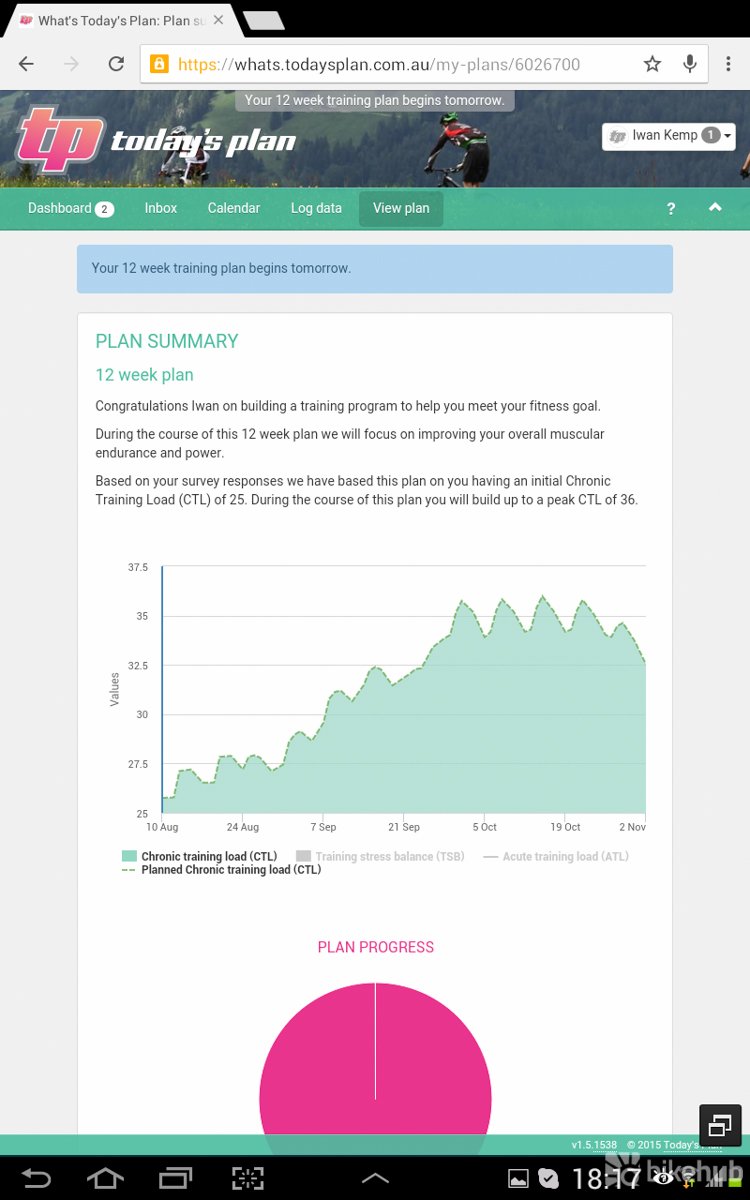
Creating a tailored training program is an easy task that only takes a couple of minutes. You have two options when first setting up a training program: 1) Pick an event you would like to train for or 2) create a fully custom training plan based on a questionnaire about your goals, health and general fitness, and time available.

If you’d like to select an event-based training program, you will need at least five weeks between your start date and the event. Once you have selected your event, the program will tailor a training plan for you based on the event’s course profile. For example, a 100km Fast One training program will look completely different to a 100km Cape Town Cycle Tour program.
ccs-62657-0-07829200-1446488526.jpg
ccs-62657-0-21936700-1446488528.jpg

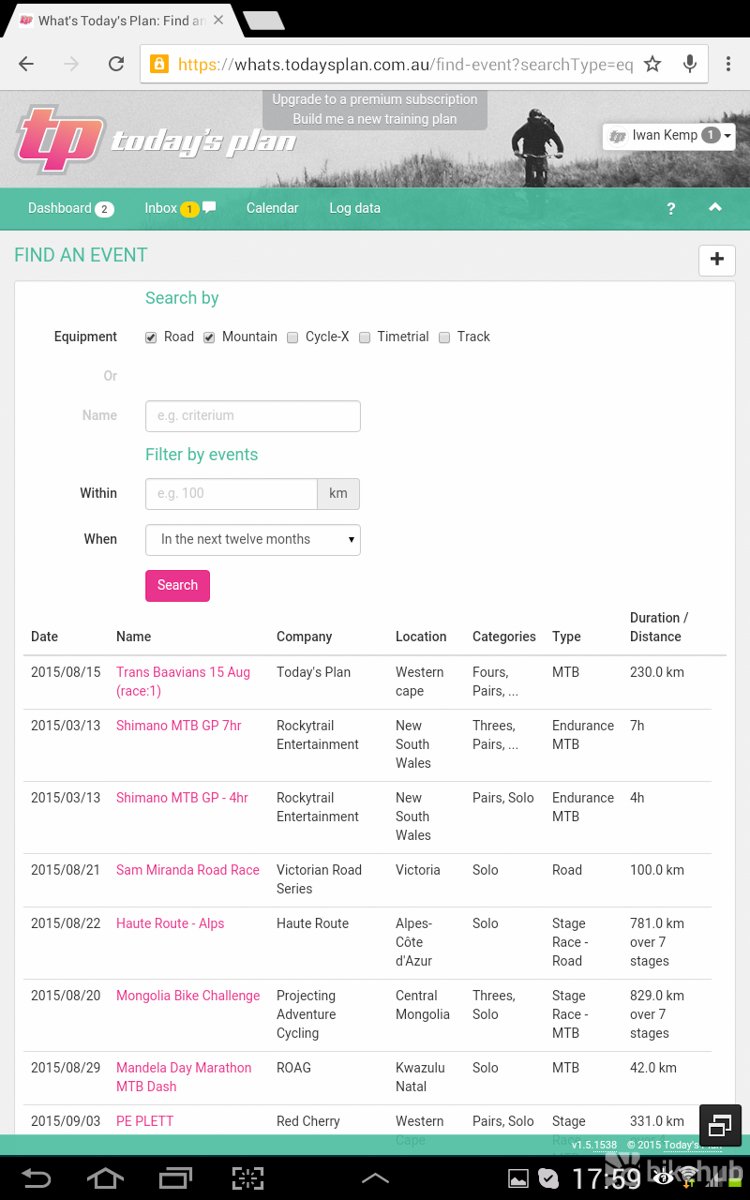
Good news is that several leading South African and international events have already been loaded. Wines2Whales, Cape Classic 380, Coronation Double Century, Desert Dash and Attakwas are just some of the upcoming events you can pick from the list. Even better yet, if your race is not there simply email support and they will add it for you usually within 24 hours from logging your request.

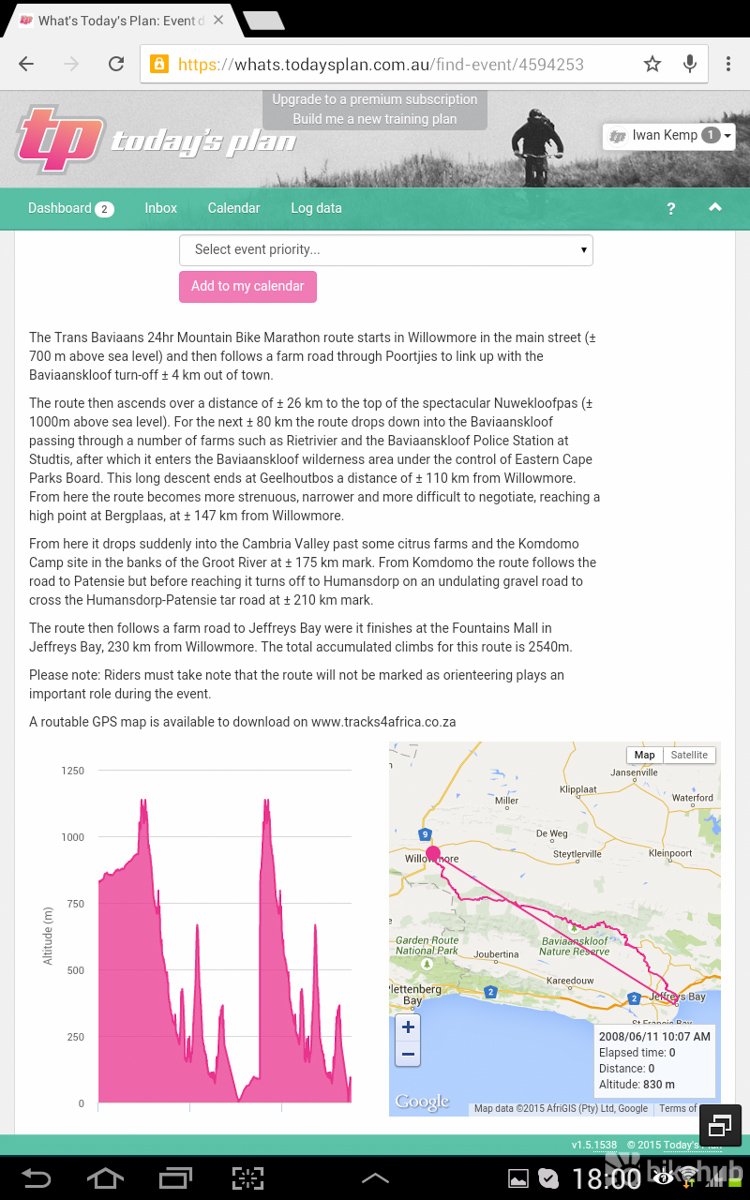
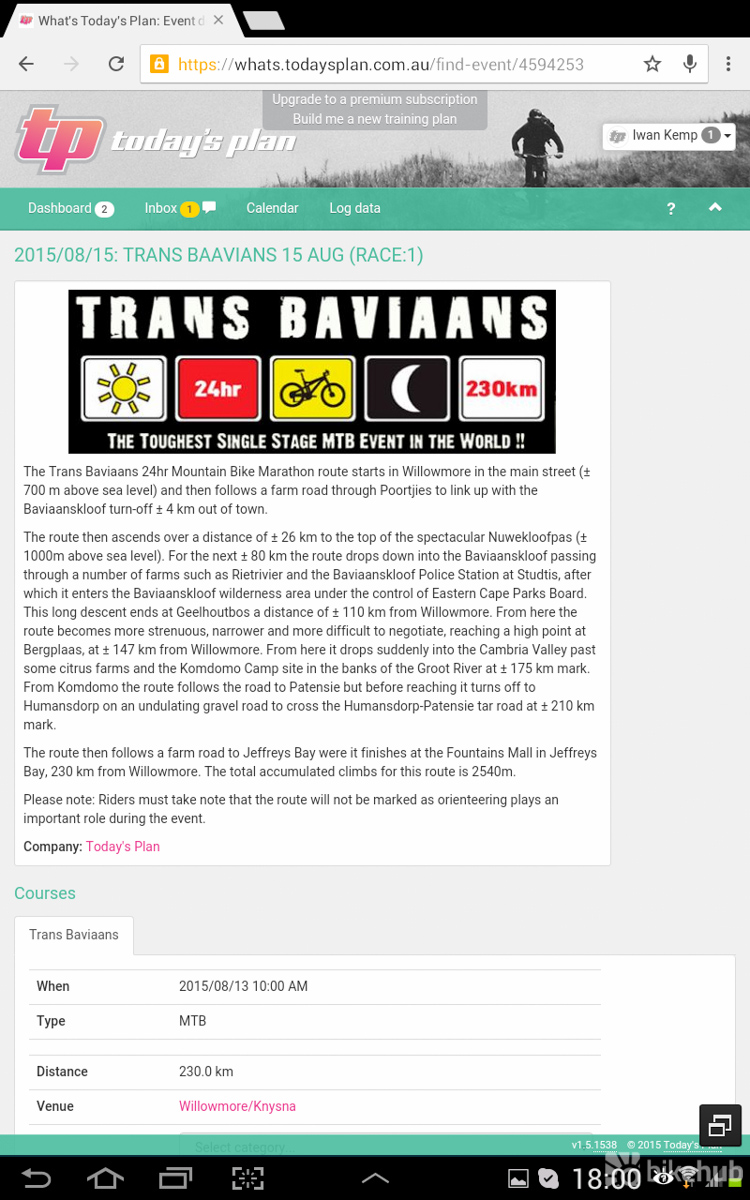
Selecting to train for the Trans Baviaans, Today’s Plan will ask you whether you will be racing Solo or Paired and what your event priority is.

If you opt to create a training plan from scratch, the questionnaire lets you select a plan from 6-16 weeks in length. You then set the parameters around your usual time on a bike, type of riding you do (Commuter, Road, MTB, Indoor Trainer, Single Speed, Time Trial, Track, etc), your goals (weight loss, target specific event, improving a specific cycling skill), your strengths & weaknesses, accessories you’re planning to use and then finally you select how many hours a week you’re willing to dedicate to training. The minimum requirement is five hours a week, and you can specify how many hours you’re able to train on each day of the week.
ccs-62657-0-75145400-1446488521.jpg
ccs-62657-0-06967800-1446488523.jpg
ccs-62657-0-44969700-1446488524.jpg

It also asks several crucial questions that I wasn’t sure of such as your anaerobic threshold or threshold watts (if you’re using a heart rate monitor or power meter). Thankfully where answers are not known it provides an average based on other parameters. This data is later automatically replaced following results from training tests.

You will need a cycling computer or training tracking device (GPS head unit or cellphone with GPS) in order to upload your data to Today’s Plan for analysis and fine tuning. Although not needed to use their analytics or to complete a training plan, it is highly recommended to use a heart rate monitor and a power meter as they are great tools for cyclists looking to better track their training, monitor their performance and objectively measure their improvements.

For most of my training I used a Wahoo KICKR indoor trainer, Wahoo TICKR X and RFLKT+ bike computer, Giant Propel Advanced 2 and my trusty LG G4 with a LG G3 used for a short while as well.

Using It

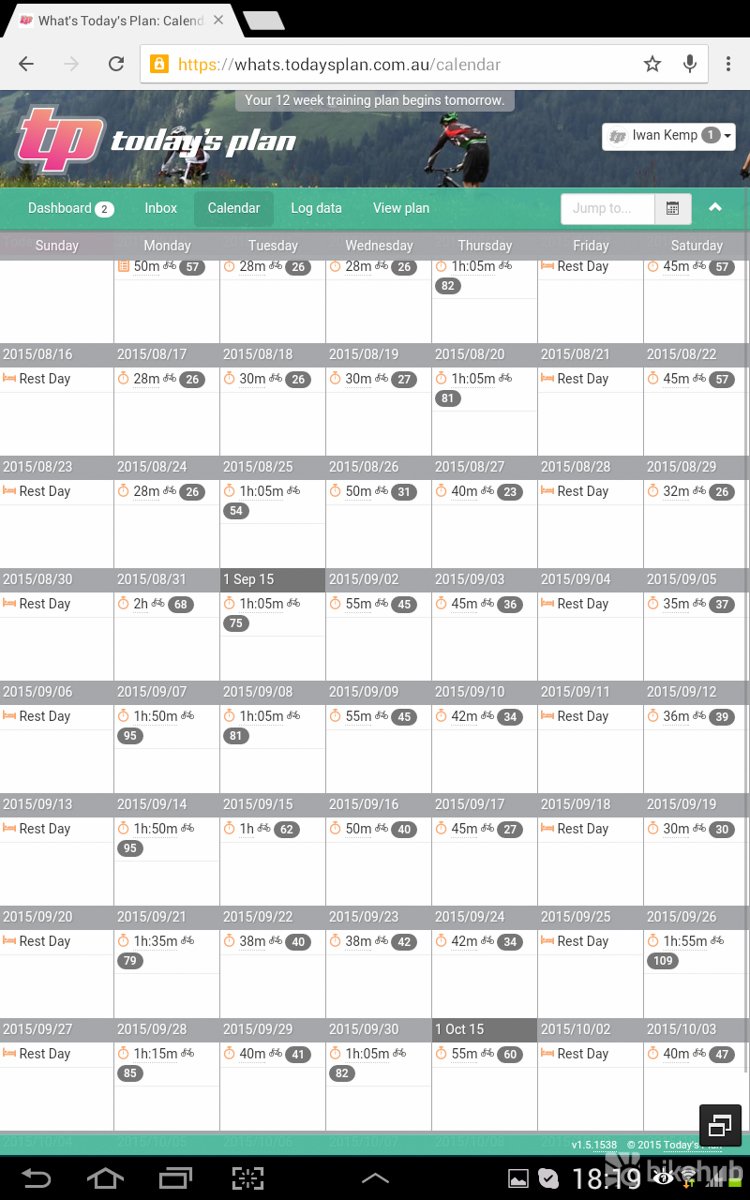
Once you’ve gone through the quick process of setting up a training program it only takes a couple of minutes for Today’s Plan to have your training program up and running. The plan that was worked out for me did not match what I’ve specified 100% in terms of training per day (first couple of rides were shorter than I specified), but it worked to my daily parameters as close as possible to deliver a workable, realistic training plan. There is still room to move some training sessions around and edit where needed and, should you miss a day, you can move that training session to the next day.

Every session has a warm up and cool down portion to get you in and out of the swing of things. The aim of your session (Endurance, SST, Threshold, Test, etc) is noted and if you’re unsure what it means there is a YouTube video for everything. And, with videos covering Using your Inbox to Calibrating your Stages Power Meter, I mean everything. Accessing the videos is quick and easy, as there’s a play icon on just about every screen. Hitting that will open the video and give you a quick rundown of what you need to know. The tutorials are short and to the point. I have to compliment Today’s Plan on these. If you’re new to the world of coaching and training plans these videos will be of great help and takes all of the doubts and unknowns out of the experience.
ccs-62657-0-59184600-1446488538.jpg

I used the Today’s Plan app on my LG G4 most of the time to control my training. Syncing it with the Wahoo KICKR took seconds and I only had an issue with the RFLKT + bike computer causing the app to crash. Although not technically an issue on Today’s Plan side, they solved the issue within days and it worked 100% from there. The app offers several layouts and you can choose what you’d like to see in each block on your screen and this also automatically updates the layout on the RFLKT +. Nifty.

You can choose to receive an email on training days as a reminder. If you’d like you can access that day’s session straight from there or view it online in your calendar. To get going I would open the app, select the day’s ride and by the time I had put on my shoes it would be waiting for me to get going. Click start and you’re off.

Once going the app takes full control of the indoor trainer adjusting resistance as needed – all you have to do is hit those targets and stay within the parameters in order to get the most out of the day’s session. When the day’s workout has been completed and uploaded, you’re prompted to offer some feedback about how you’re feeling. This data is used to shape your future sessions.

Analytics
ccs-62657-0-46775100-1446488535.jpg
ccs-62657-0-84217400-1446488536.jpg

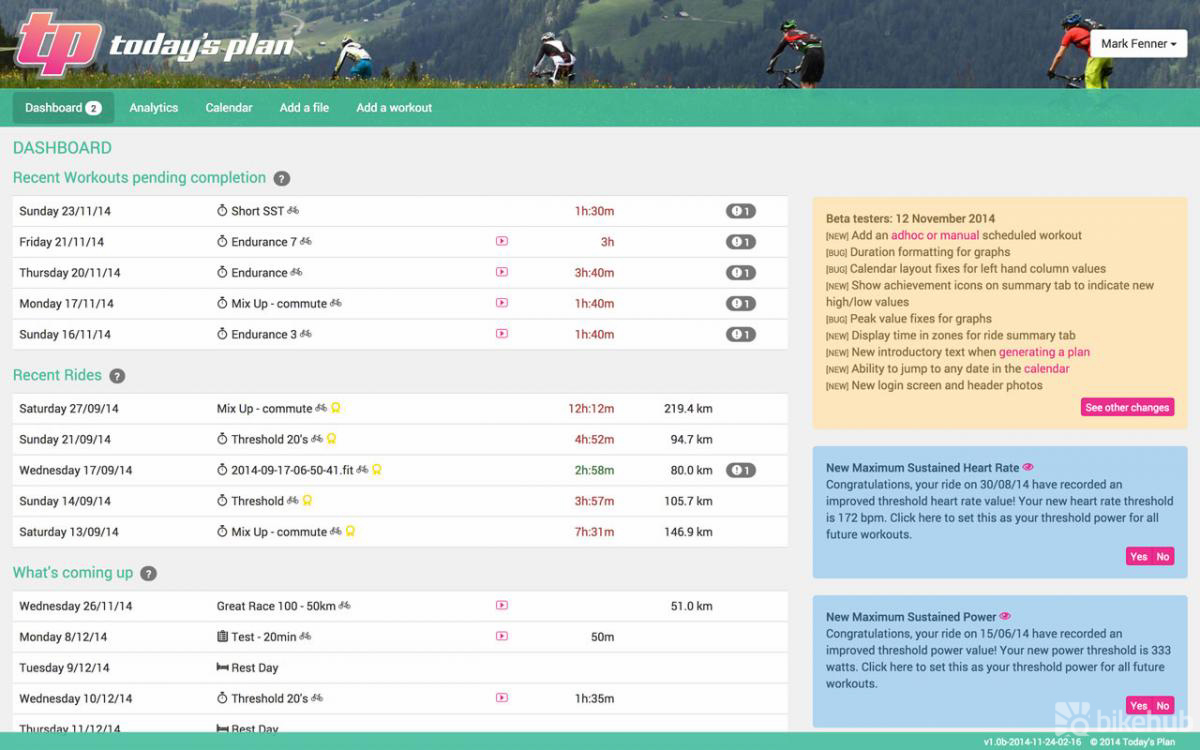
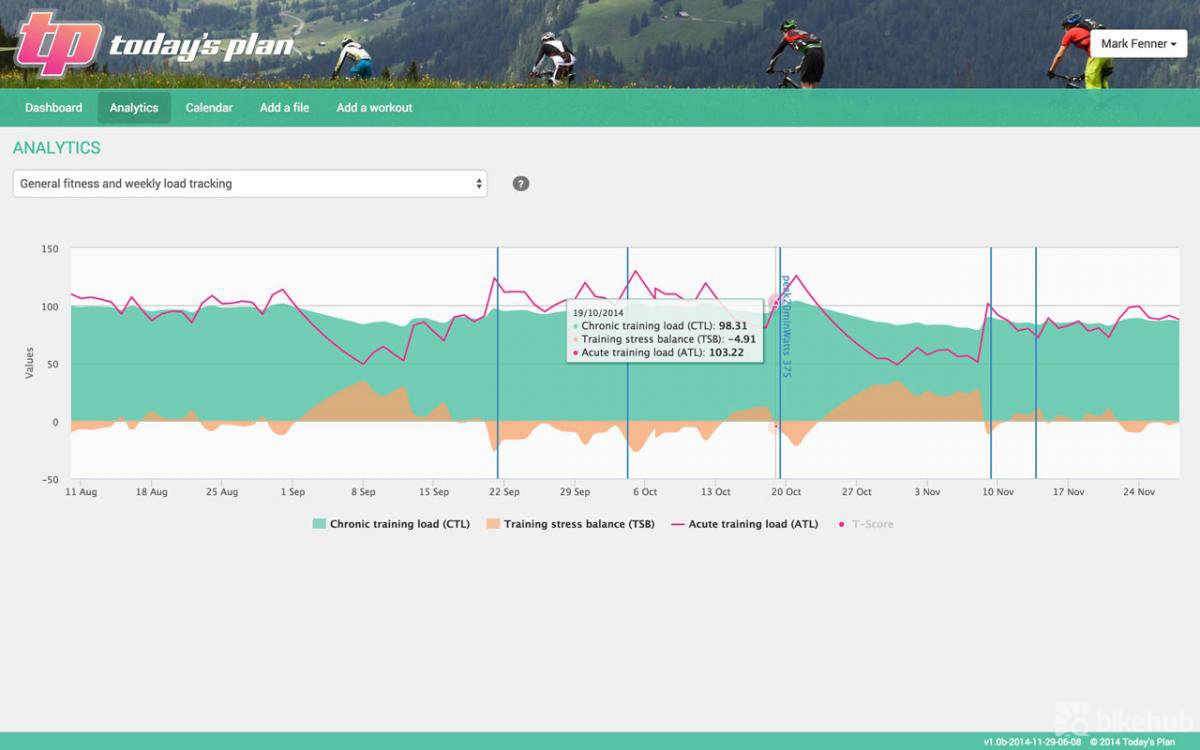
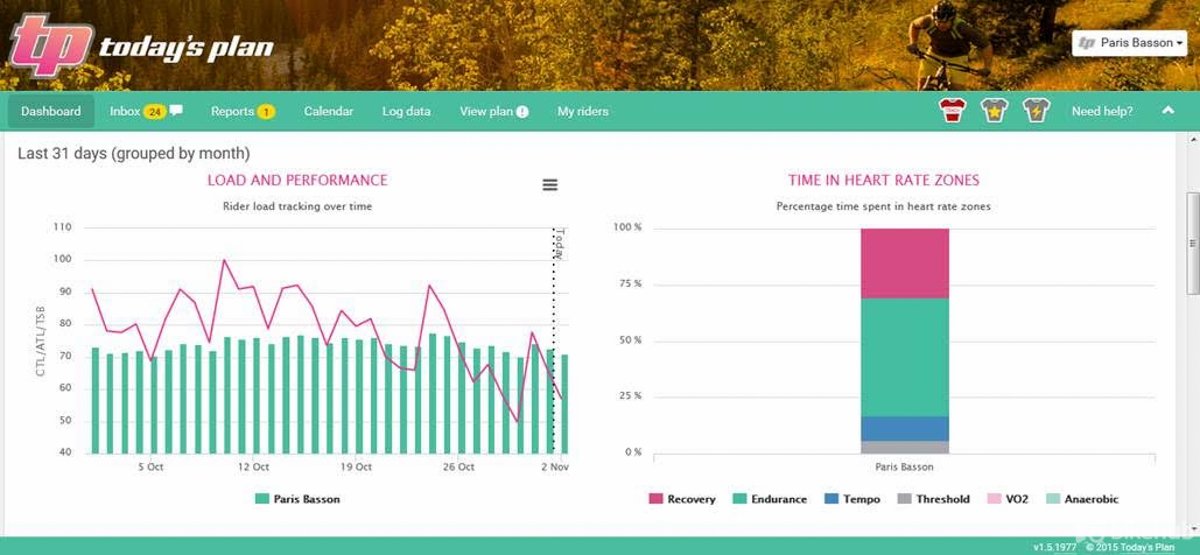
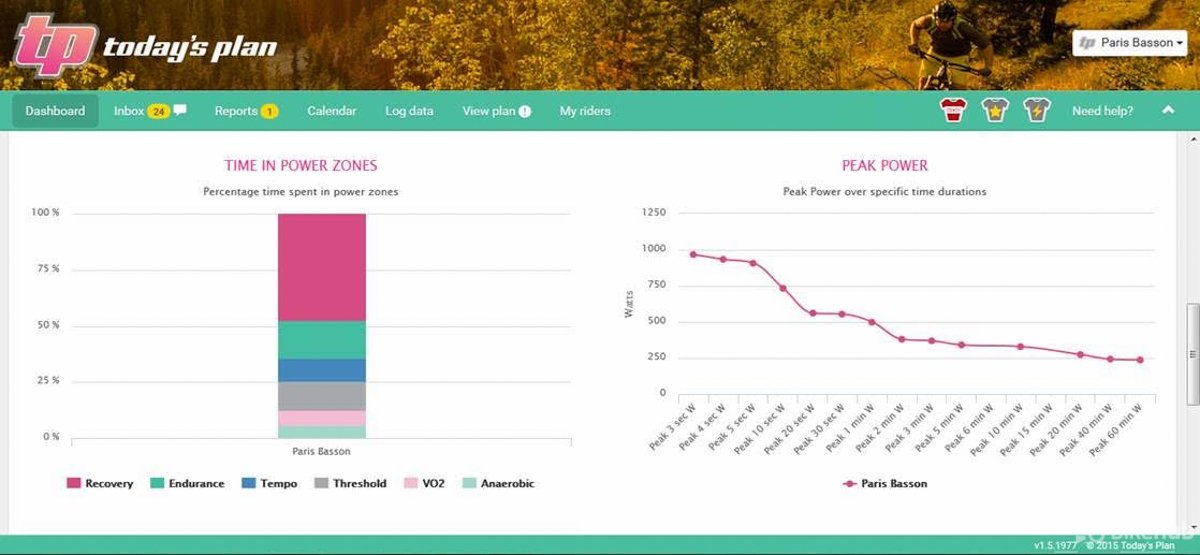
This is where the real fun starts. You can now start tracking your training and improvements. Your online dashboard is fully customisable and allows you to add or remove widget or graphs to your heart’s content. I found it best to start with the bare minimum and to then add as my knowledge and confidence grew. It obviously also helps to have a good couple of rides in there to populate the graphs.

Good news is that you can import .fit, .gpx, .ant, . srm and several other file formats or the option to enter ride data manually. You can even import data from TrainingPeaks and yes, there is a video for all of this too. While I was busy with my program, it was announced that they have integrated with Garmin Connect. This allows WiFi uploads to Today’s Plan on 510/810/1000 head units. Alternatively, every time a user loads to Garmin Connect the data will go to Today’s Plan so no need to plug into a computer to upload your rides.
ccs-62657-0-86006000-1446488532.jpg
ccs-62657-0-38408300-1446488534.jpg

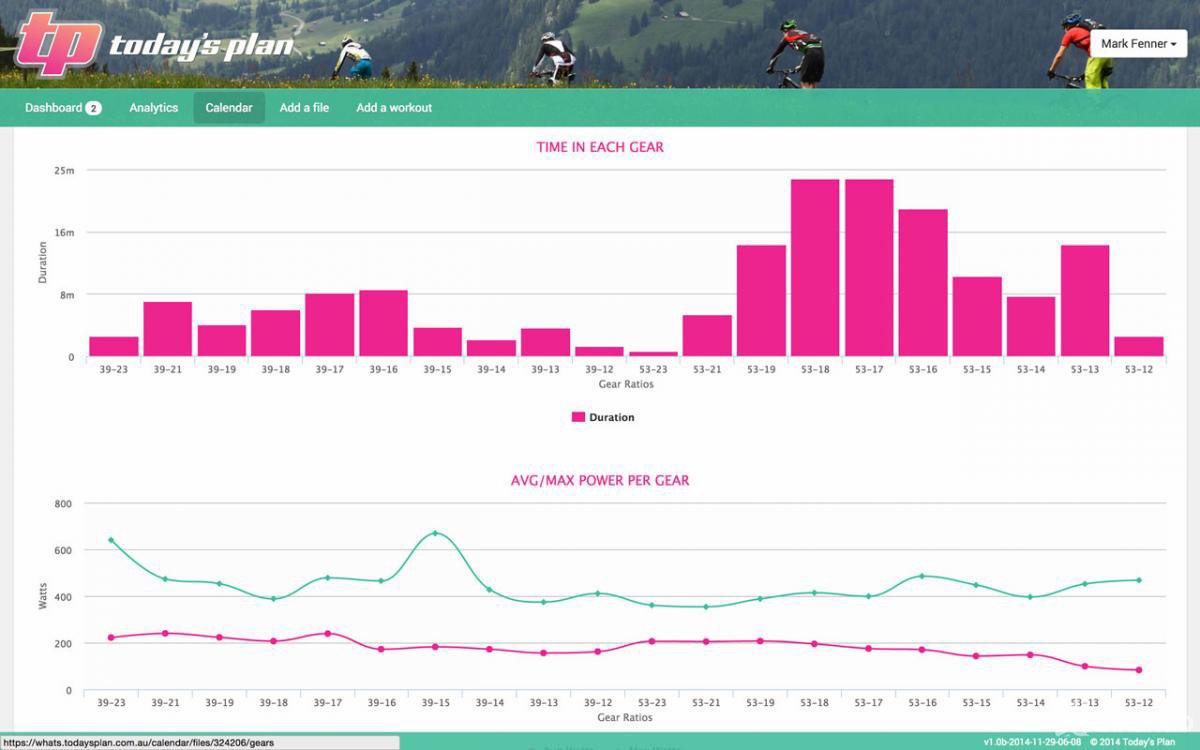
To highlight the extent of data and analytics available: Shimano integration will give Di2 riders the ability to analyse time spent in and choice of gear. This will allow you or your coach to work out where you could be more efficient through better gear choice.

Verdict

I was, and still am, amazed at how much can be done using an online training program and your cellphone. Incredible day and age we live in. Creating an, almost living breathing, online training program takes only a couple of minutes and it adapts to your results all the way through. Using it with a Wahoo KICKR indoor trainer takes it to another level where all you have to do is show up and give your best.

Several features and updates were added in the three months I used Today’s Plan. The online dashboard, mobile app and training program in general is very mature, but it’s great to see the developers aren’t sitting still basking in their glory. By their own admission their training program does not replace a real-life coach, but it will get you 95% there and if you do use a coach you can give them remote access to your data to help steer you in the right direction.

As it is Today’s Plan has almost no equal – certainly not one that I’m aware of and certainly not for nearly as little as their yearly unlimited plan including full analytics. If you’re serious about your cycling, working on your fitness or (finally) busting that gut, I can’t think of an easier, cheaper, more interactive way than this.

Best yet, if you’re a coach Today’s Plan offers a powerful and easy to use tool to manage, motivate and keep track of your athletes and their progress.

Pros

  • Ease of use
  • Tutorials on every possible topic
  • Affordable
  • Customizable
  • Excellent support
  • Value for money
  • Help videos and tutorials are very helpful and to the point

Cons

  • This is online – you need to show up motivated and stay focused all by yourself
  • To get the most our of it you will need to invest in some proper gear (Power meter, Indoor Trainer will built in power meter, Heart Rate Monitor, etc)

Options and Costs
ccs-62657-0-92797000-1446489180.jpg
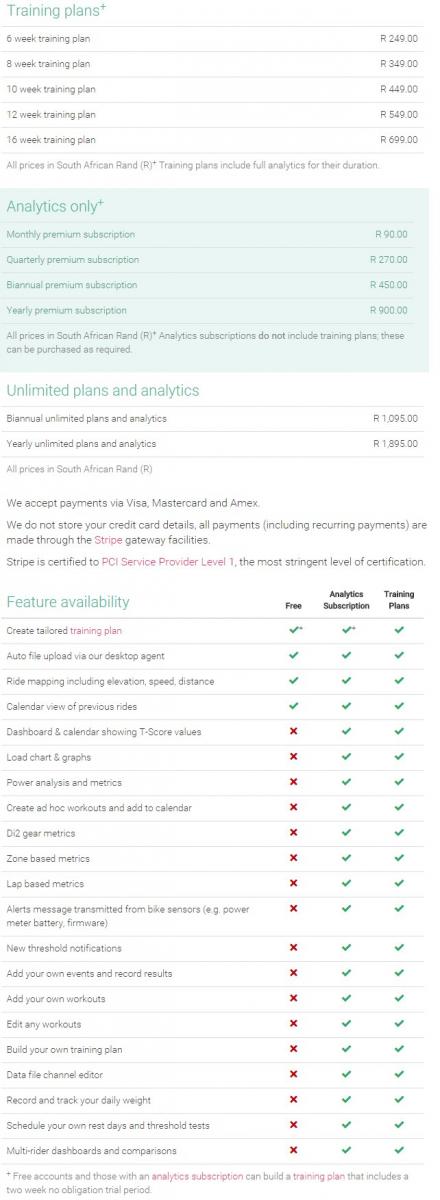
Check out the latest plans and pricing here: https://www.todaysplan.com.au/pricing/?currencyId=1

From Today’s Plan

Today’s Plan is an affordable online virtual coaching program with full and easy to read analytics. The programs are targeted at cycling specific for riders spending 3-4 days a week riding and suitable for all bike types (Road, MTB, CX and commuters). Our training plans are scientifically based on the methodology of our Sports Scientist, and are fully tailored (by the user, via the web) to the rider’s current fitness level, time available for training, goals (also event based!) and their strengths/weaknesses.


http://www.todaysplan.co.za/

Comments

Lexx

Nov 5, 2015, 9:19 AM

Have you already started on your 36ONE plan? Mine only starts on 26 December. 

Nope, only went through it on my Calender. Mine also starts somewhere around there, But the long rides are still bothering me. Longest ride in Hours is about 6 Hours. Which is not Ideal. I mean you will be out there 17+Hours, and you have to train your body to ride a long long time. So I think, maybe I will do my own Long Rides on a Weekend, 200km+. But otherwise it doesn't look to bad.

Lexx

Nov 5, 2015, 9:23 AM

Thanks TP! I have created a 6 week endurance plan starting next week.


Wrt to the coaching, thanks for the info. I am not really planning on using the services of Sven Lauer. That was an attempt at a stoopid joke. Do a search on the BikeHub for Sven Lauer. You'll be amazed.  ;)

No Ways, is he that same Sven from the thread a couple of months ago.....

Saag

Nov 5, 2015, 9:33 AM

Also decided to give this a go, and I am very pleasantly surprised!


Up to now I have used a mixture of Strava, Garmin, VirtualCycling to gather info, Trainer Road for a scheduled training plan and Golden Cheetah to try and make sense of the data (ended up only always looking at the stress under PMC).

Golden cheetah shows my fitness improving continuously, although I have been training "different", and I definitely do not see the gain during races.


After importing my results into TP (very simple to do), it shows very clearly I have gone backwards overall.

The info is all nice and relevant, with enough to keep you interested, and not too much to overwhelm you.


So far the android app working nicely and looking forward to trying out the training plan itself.

HappyMartin

Nov 5, 2015, 5:42 PM

Im still laying around. Adding and deleting plans to see how they look and and get a feel for the process.


It looked a bit much to start with but once you get into it it's really simple and very comprehensive. Love the way there are little videos all over the place to describe things like the type of session you must do and so on. The amount of helpful detail is crazy, such as telling you sunset and sunrise times for the day of that planned ride. Very useful that.


I think I am going to pull the trigger on this one. I am the type of guy who will religiously stick to a plan but if there is no plan I will be inclined to skip the ride. This is simple to put together and track.


Can't really comment on the quality of the actual plan. I'm simply not equipped to do so but it looks good to me.

Today's Plan

Nov 6, 2015, 8:40 AM

Im still laying around. Adding and deleting plans to see how they look and and get a feel for the process.


It looked a bit much to start with but once you get into it it's really simple and very comprehensive. Love the way there are little videos all over the place to describe things like the type of session you must do and so on. The amount of helpful detail is crazy, such as telling you sunset and sunrise times for the day of that planned ride. Very useful that.


I think I am going to pull the trigger on this one. I am the type of guy who will religiously stick to a plan but if there is no plan I will be inclined to skip the ride. This is simple to put together and track.


Can't really comment on the quality of the actual plan. I'm simply not equipped to do so but it looks good to me.

Hi HappyMartin,


Thanks for the feedback, and encourage you to keep posting your results. We are confident that if you do the Threshold tests and your personal zones are set correctly the workout sessions will be captivating and will see the results over the course of your program. The easy to read Dashboards will give you intuitive overview and all sessions will be explained in a simple format via email each morning (if you enable alerts) along within Today's Plan.


Happy spinning!

HappyMartin

Nov 8, 2015, 10:30 AM

I am not a natural at this stuff but I am slowly figuring it out. I am trying all sorts of things before I commit. At the moment I am having an issue figuring out how to load a T score manually. Perhaps I am doing something wrong but it just isn't recording. Rides from my Garmin upload easily and give easy to read graphs and very useful information. The thing is I get sloppy with the Garmin sometimes and just don't always bother so need to get info in manually.


I logged a query for support with this issue and the feedback was very fast. Got some immediate advice which hasn't helped me, perhaps I am doing something wrong, so I sent off another query and within an hour had a response. Not a canned response either. The person who responded obviously looked at my info and figured out which files I am having issues with.


Quite honestly I am blown away with the support and the software. It really is fantastic.

Karman de Lange

Nov 13, 2015, 12:14 PM

Anyone else having issues with ride time vs caffee time getting calculated wrong?

HappyMartin

Nov 20, 2015, 11:08 AM

I pulled the trigger on this yesterday and bought a subscription. It has become a big part of how I train. 

Karman de Lange

Nov 20, 2015, 11:32 AM

Anyone else having issues with ride time vs caffee time getting calculated wrong?


Update: Seems to be issue with GPX exports from strava ,  direct upload works fine.

NISI

Nov 20, 2015, 11:35 AM

I pulled the trigger on this yesterday and bought a subscription. It has become a big part of how I train. 

Hallo, do you use a PM or are you training on HR?

Thanks

HappyMartin

Nov 20, 2015, 11:40 AM

Hallo, do you use a PM or are you training on HR?

Thanks


HR at the moment. It is my intention to move to power next year. I wanted to find some software I could cope with before buying a meter and TP seems to fit the bill for me.

typhoon

Nov 20, 2015, 11:47 AM

Thanks TP for the plan that I won, I'll definitely start playing with it soon!

Wasn't too sure if I should start it now or wait, with the holidays coming up and going away, although it's with the bikes, so there isn't any reason not to start now. ;)


There seem to be quite a lot of positives coming out of this thread!

NISI

Nov 20, 2015, 3:16 PM

HR at the moment. It is my intention to move to power next year. I wanted to find some software I could cope with before buying a meter and TP seems to fit the bill for me.

thx

Veebee

Nov 23, 2015, 12:15 PM

Got myself an IDT last week, and since I have virtual power i've been playing around with the "free" plan.


So far its going ok, just finding all the graphs a bit confusing but I guess this will get better as I get more data added.


Was looking at signing up to TrainerRoad, and now I see that TP has the option to export to TrainerRoad so this makes life easier.


Will purchase a full plan for CTCT soon.

Today's Plan

Feb 26, 2016, 9:13 AM

Just a heads up we are doing some weekly training tips follow #trainwithtrek on social media for the inside tips


.

Today's Plan

Jun 9, 2016, 6:21 AM

Let me be the first to ask an obvious question.


I use a powerbeam pro as an IDT and then my iPhone/strava when on the trails. In both cases I have the option of a HRM and cadence, but power only on the IDT.


Does this meet the technical requirements of the programs?

Hi Joeboy, yes we should have no problem injesting your data. You can send us a sample of your ride and can ensure your files are all ok if you have question drop us a line on our site via the help button and will assist ASAP thanks

fanievb

Jun 9, 2016, 6:30 AM

Hi Joeboy, yes we should have no problem injesting your data. You can send us a sample of your ride and can ensure your files are all ok if you have question drop us a line on our site via the help button and will assist ASAP thanks


Hi 


Are you guys planning integration with Garmin Connect?


I've been playing around the site for some time, but uploading workouts manually is a pain.


Also, are you planning any Triathlon training plan in the future

Today's Plan

Jun 26, 2016, 10:01 AM

Hi 


Are you guys planning integration with Garmin Connect?


I've been playing around the site for some time, but uploading workouts manually is a pain.


Also, are you planning any Triathlon training plan in the future

Hi there,


We have had Garmin Connect integration for over 6 months now, you can automatically upload directly from there per these instructions; https://whats.todaysplan.com.au/en/help/how-do-i-setup-my-garmin-510810-to-auto-upload-to-todays-plan-garmin-connect


Yes multisport is on our 2016 roadmap.


Thanks and hope you enjoy your training. If you have any further questions please responsed via the  "need help" on site for fast answers.

fanievb

Jun 26, 2016, 10:27 AM

Hi there,


We have had Garmin Connect integration for over 6 months now, you can automatically upload directly from there per these instructions; https://whats.todaysplan.com.au/en/help/how-do-i-setup-my-garmin-510810-to-auto-upload-to-todays-plan-garmin-connect


Yes multisport is on our 2016 roadmap.


Thanks and hope you enjoy your training. If you have any further questions please responsed via the  "need help" on site for fast answers.


thanks, I got sorted with the Garmin integration

Lexx

Jul 4, 2016, 7:19 PM

Will Running also be incorporated into your Roadmap Plan for 2016. Because I use your plan for the 36One, and it was awesome.

If I could get a training plan like that for the comrades, I would be a happie chappie... :clap:

Today's Plan

Jul 18, 2016, 1:24 PM

Will Running also be incorporated into your Roadmap Plan for 2016. Because I use your plan for the 36One, and it was awesome.

If I could get a training plan like that for the comrades, I would be a happie chappie... :clap:

Absolutely Multisport is on our roadmap for 2016 ! Just adding more cycle specific features to ensure we are ahead of the curve then will bring on multisport. However can currently add your unstructured workouts (gym,swim,run,weights) with associated Tscores to your program to ensure Load and performance tracking is accurate!   Just ping us a any questions via the site- thx

Veebee

Jul 18, 2016, 1:26 PM

Any possibility of adding an Amashova training plan to your database ?

fanievb

Jul 18, 2016, 1:34 PM

Any possibility of adding an Amashova training plan to your database ?


i suggest you send them a msg on their site, they are not very efficient when it comes to replying on the Hub

Today's Plan

Sep 15, 2016, 9:54 AM

Huge news on Todays Plan side as have partnered with Team Sky moving forward :


See: Sir Dave Brailsford, Team Principal of Team Sky


https://youtu.be/IaMujsBs4vE


https://www.todaysplan.com.au/2016/09/tour-de-france-winners-team-sky-chooses-australian-tech-company-to-stay-ahead-of-their-competition/


This will mean even bigger things to come for coaches and athletes signed up to www.todaysplan.co.za

Today's Plan

Sep 15, 2016, 9:56 AM

Any possibility of adding an Amashova training plan to your database ?

Please direct all requests and support questions via your TP account (need help-button), so can swiftly answer all questions - thanks

Add a comment

You must log in to comment