Tech

GoPro HERO9 offers 5K video and 20-megapixel stills

Supplied by GoPro.

By Press Office · 46 comments

Press Release

GoPro today announced its new camera, HERO9 Black—featuring “more everything”—including a new sensor that delivers 5K video and 20 megapixel photos, next-generation HyperSmooth 3.0 video stabilization with in-camera horizon leveling, a new front-facing display, a larger rear display, 30% more battery life, and a Max Lens Mod accessory that brings Max HyperSmooth video stabilization and Max SuperView ultra wide-angle photo and video to HERO9 Black.

HERO9 Black Features:

  • New Image Sensor
  • Video: 5K30, 4K60, 2.7K120, 1440p120, 1080p240 and more
  • Photo: 20MP
  • New 1.4″ front color display with live preview and status modes
  • Larger 2.27″ rear touch display with touch zoom
  • 30% more battery life than HERO8 Black with improved cold weather performance
  • Removable, rechargeable battery
  • HyperSmooth 3.0 with in-camera horizon leveling
  • TimeWarp 3.0 featuring Real Speed and Half Speed
  • 1080p Live Streaming
  • 1080p Webcam mode
  • Power Tools: HindSight, LiveBurst, Scheduled Capture and Duration Capture
  • SuperPhoto + HDR Night lapse video
  • RAW photos
  • Digital lenses
  • Voice control with 14 commands in 11 languages + 6 accents
  • 3 microphones with advanced wind-noise reduction
  • Stereo + RAW audio
  • Larger speaker for improved audio playback
  • Removable lens cover
  • Built-in folding mounting fingers
  • Rugged + waterproof to 33ft (10m)
  • Compatible with Max Lens Mod, Light Mod, Display Mod and Media Mod for HERO9 Black

HERO9 Black is available globally for an MSRP of $449.99.

Introducing the All-New Max Lens Mod for HERO9 Black
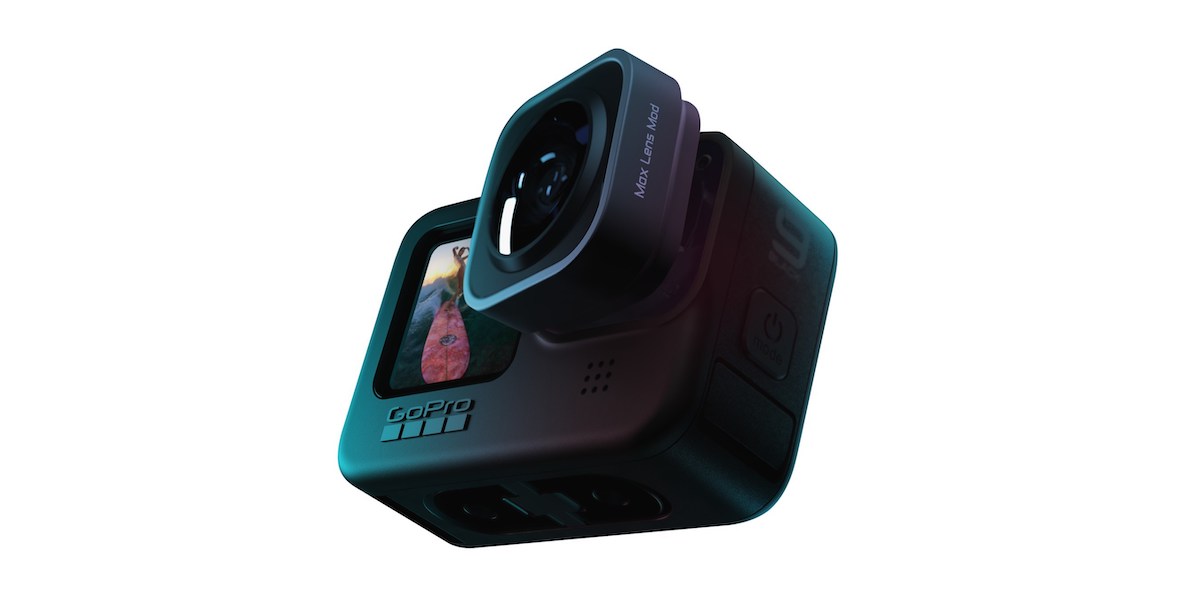
ccs-62657-0-17757800-1600276946.jpgThe all-new Max Lens Mod ($99.99) brings unbreakable Max HyperSmooth video stabilization and low-distortion, ultra-wide Max SuperView to HERO9 Black at up to 2.7K60 resolution. Max Lens Mod also allows for horizon lock even when the camera is rotated a full 360°.

The all-new Max Lens Mod ($99.99) brings unbreakable Max HyperSmooth video stabilization and low-distortion, ultra-wide Max SuperView to HERO9 Black at up to 2.7K60 resolution. Max Lens Mod also allows for horizon lock even when the camera is rotated a full 360°. This enables mind blowing creative versatility for social media producers, film and television professionals and weekend warriors, alike.

HERO9 Black-compatible Mods also include the Media Mod for HERO9 Black ($79.99), now with a removable foam windscreen; Display Mod ($79.99); and Light Mod ($49.99).
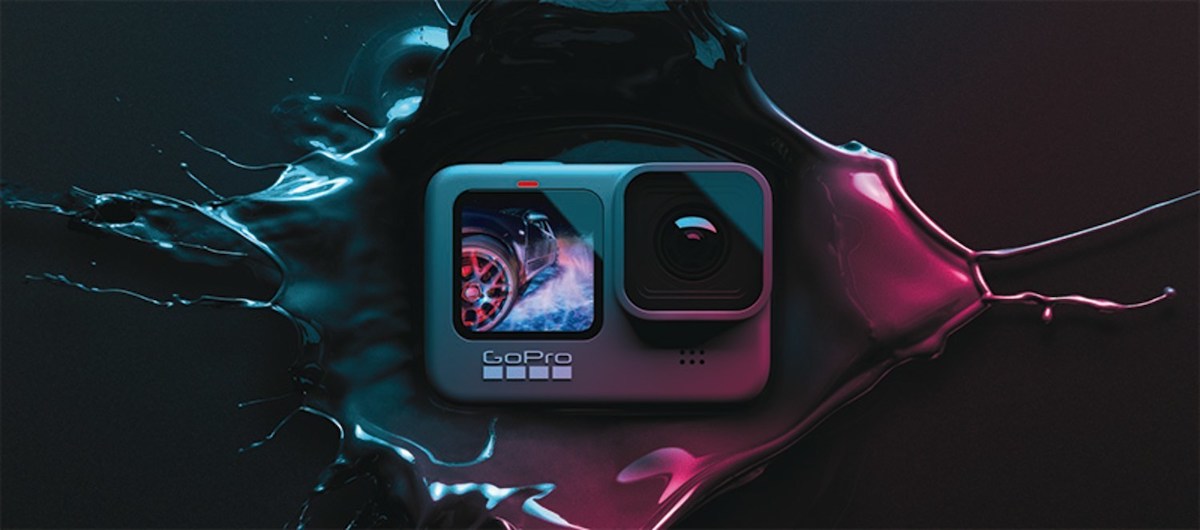
ccs-62657-0-53294100-1600276879.jpegHERO9 Black—featuring “more everything”—including a new sensor that delivers 5K video and 20 megapixel photos, next-generation HyperSmooth 3.0 video stabilization with in-camera horizon leveling, a new front-facing display, a larger rear display, 30% more battery life, and a Max Lens Mod accessory that brings Max HyperSmooth video stabilization and Max SuperView ultra wide-angle photo and video to HERO9 Black.

Tags:

Comments

DR ◣◢

Sep 27, 2020, 9:49 AM

Should convert GPR to DNG. DNG being a universal raw format supported by pretty much everything.


I edit on Capture One. They have a free version but I’m not sure if it supports DNG as its camera specific.

ChrisF

Sep 27, 2020, 10:03 AM

Should convert GPR to DNG. DNG being a universal raw format supported by pretty much everything.


I edit on Capture One. They have a free version but I’m not sure if it supports DNG as its camera specific.


Had to do the same when a friend wanted me to edit some of his new Nikon RAW images.  Once converted to DNG it worked fine.


Both Lightroom 5.7 and my much older Photoshop imports DNG happily.

WrightJnr

Sep 27, 2020, 10:46 AM

7b49a81d72661f6470ea11dc23e4561c.jpg


Pulled the trigger on this bad boy. My first ever GoPro / Action Cam. Steep learning curve!

ChrisF

Sep 27, 2020, 10:58 AM

Enjoy !!

SwissVan

Dec 29, 2020, 3:28 PM

7b49a81d72661f6470ea11dc23e4561c.jpg

Pulled the trigger on this bad boy. My first ever GoPro / Action Cam. Steep learning curve!

Me too.... wifey gave me one for Xmas

Not sure if she realizes what this means....


Would be nice if we had a dedicated thread that GoPro users could share their experiences on.


My first question would be, what kind of mount do you recommend using for cycling and other outdoor sports (in my case snowboarding). I’m inclined towards a chest mounted position, but not sure about the technicalities and mount options.... where to shop / buy from online?

capediver

Dec 29, 2020, 3:42 PM

Me too.... wifey gave me one for Xmas

Not sure if she realizes what this means....


Would be nice if we had a dedicated thread that GoPro users could share their experiences on.


My first question would be, what kind of mount do you recommend using for cycling and other outdoor sports (in my case snowboarding). I’m inclined towards a chest mounted position, but not sure about the technicalities and mount options.... where to shop / buy from online?

Cycling, don't bother about mounting anything on the bike itself...despite the great stabilisation ability of the GoPro, it will not be able to handle the constant judder of a direct mount to the bike...maybe road bike but definitely not MTB....unless you want some B roll and the shake is part of the plan...but generally stay away from handle bar/bike mounts...again MTB.

A chesty is definitely the way to go for a bike, with the superview wide angle on, you get a great perspective..bars in foreground, the trail/road out back...and its more stable....

A head/helmet mount is another option, your head is a great gimbal! But footage become boring fast cause the view angle never changes...again, OK for B roll.

Snowboarding...pole mount works great, a nice long extendable selfie stick.... chesty too but the angle needs to be set as you are facing sideways mostly...head/helmet mount works too.

If you can get, use GoPro mounts they are better quality, their online shopping is not bad and in Europe should be able to deliver pronto.... stay away from cheap stuff on Ebay or Aliexpress, they almost always suck and made from cheap plastic and brittle. 

ChrisF

Dec 29, 2020, 4:46 PM

Me too.... wifey gave me one for Xmas

Not sure if she realizes what this means....


Would be nice if we had a dedicated thread that GoPro users could share their experiences on.


My first question would be, what kind of mount do you recommend using for cycling and other outdoor sports (in my case snowboarding). I’m inclined towards a chest mounted position, but not sure about the technicalities and mount options.... where to shop / buy from online?

Enjoy.


Interesting learning curve ....


Mounting - the chest mount is good, but I dont like being strapped in too long ... so I most often use the bar mounted bracket from Garmin. They have a "pro" mount, you set it up before the ride, then need tools to change angles .... I opted for the unit with the quick swiwel mount. Easy to change the camera direction while riding, super handy when something is happening next to you.


Battery life, and hard drive space .... easy when you plan to take a few shots, and then you miss moments, and then you keep the camera on ....


Video editing .... so now you have digital mountains of clips .... finding your ideal editing software is the key to stay on top of this .....


SOUND .... finding the right sound track is the key to a good video ...


I certainly dont have the answers to the last items .... will follow this thread, and hoping others share their solutions.

Tankman

Dec 30, 2020, 6:31 AM

Jpg works fine.


RAW format allows a lot more editing options, but the GoPro RAW format only works on the very latest subscription Lightroom software .... I am perfectly happy with my paid Lightroom. If I wanted to get the new lightroom I would also have to upgrade Windows .... this can become an expensive exercise ....


PS I love using the time lapse photo function ...


EDIT ... Really hope somebody has a hack to use the RAW photos ....


Download Adobe DNG Converter


Convert GoPro Raw files to DNG, Import to LightRoom .... BOOM!


Been doing it since the 8.

Tankman

Dec 30, 2020, 6:34 AM

Or since the 7 even, cant remember, whichever one first came out with RAW... that's been my way.

T_Boss

Dec 30, 2020, 6:53 AM

Me too.... wifey gave me one for Xmas

Not sure if she realizes what this means....


Would be nice if we had a dedicated thread that GoPro users could share their experiences on.


My first question would be, what kind of mount do you recommend using for cycling and other outdoor sports (in my case snowboarding). I’m inclined towards a chest mounted position, but not sure about the technicalities and mount options.... where to shop / buy from online?


Chest mount works well, but be sure of the angles you mount it at, especially when your getting loose and moving around the bike. 


first time out, I set it up while seated.... and thought the angle was great, until I stood up and got behind the saddle, and had the whole trail with me just filming the handlbar and front wheel.....


(as an aside - EWS rules dont allow chest straps, only helmet or bike mounted cameras - not sure if its a safety thing, but maybe something to keep in mind)

ChrisF

Dec 30, 2020, 6:56 AM

Download Adobe DNG Converter


Convert GoPro Raw files to DNG, Import to LightRoom .... BOOM!


Been doing it since the 8.

THANKS


Was thinking about this during yesterdays ride ... few awesome spots, but light range way too wide for jpg ..

ChrisF

Dec 30, 2020, 6:59 AM

Chest mount works well, but be sure of the angles you mount it at, especially when your getting loose and moving around the bike.


first time out, I set it up while seated.... and thought the angle was great, until I stood up and got behind the saddle, and had the whole trail with me just filming the handlbar and front wheel.....


(as an aside - EWS rules dont allow chest straps, only helmet or bike mounted cameras - not sure if its a safety thing, but maybe something to keep in mind)

Cycling SA also dont allow chest, nor helmet mounted, GoPro.


Thus we opted for the bar mounted ... and now continue with this on the trails.

ChrisF

Dec 30, 2020, 7:00 AM

Even with bar mounted ... play with the camera angle.


Actually nice to get part of the front wheel and trail in shot.

DR ◣◢

Dec 30, 2020, 7:19 AM

I've had great results with my old Hero+ running a chest mount. Surprisingly stable. 


I run the GoPro upside down on the mount to get my angle perfect. I edit in Premier on desktop and LumaFusion on iPad.

PhilipV

Dec 30, 2020, 3:29 PM

Cycling SA also dont allow chest, nor helmet mounted, GoPro.


Thus we opted for the bar mounted ... and now continue with this on the trails.

Fortunately influencers don't bother with CSA.


Ps: there are many helmet gopros at the enduro events. All on break away mounts. The Commisaire had no issue with it.

ChrisF

Feb 14, 2021, 11:09 AM

Download Adobe DNG Converter


Convert GoPro Raw files to DNG, Import to LightRoom .... BOOM!


Been doing it since the 8.


THANKS  :thumbup:   :clap:


Adobe RAW converter is now up to 13.1, for Windows 10 users.  I downloaded there 11.1 RAW converter for Windows 7.


Two examples for those that dont understand the fuss ....


INTO the rising sun ... the camera light sensor is overwelmed by the morning sun, and the details of the trail is lost.


Camera JPEG -

post-110956-0-82614100-1613301083_thumb.jpg


The same photo, this time from the RAW image data, with minimal tweaking in Lightroom -

post-110956-0-99491900-1613301166_thumb.jpg


Second example ... B Spot, the bridge route in the shade of the trees

Camera JPEG -

post-110956-0-86288900-1613301093_thumb.jpg


From the camera RAW -

post-110956-0-56200700-1613301182_thumb.jpg

ChrisF

Feb 14, 2021, 12:04 PM

Is that free software?


Can I get the link for windows 10 64but

The converter is freeware ... google for Adobe RAW converter 13.1


Lightroom is not freeware.


I am not up to speed with the freeware equivalents for Lightroom

Steady Spin

Feb 14, 2021, 12:47 PM

https://www.darktable.org/install/ is a good alternative to Lightroom when cash is tight.
ChrisF

Feb 14, 2021, 6:18 PM

okay so how do I open it ?


I installed it 3 times and still can't find anything with that name to launch , and now its filled up my harddrive :rolleyes: so I guess how do I delete it aswell ?

It is a new program .... easy in Win7, not sure where win10 hides it ...

Blokeonabike

Mar 23, 2021, 1:16 PM

Has anybody found a store that sells the max lens mod for the Hero 9 locally? I just realized that my current wearable gimbal doesn't work with the bigger hero 9.


With that being said, anybody looking for a wearable gimbal? :whistling:

Bundu Ric

Mar 23, 2021, 1:34 PM

Drop me a DM with the gimbal details and price, a friend of mine were looking for a gamble for her Gopro 7.


Has anybody found a store that sells the max lens mod for the Hero 9 locally? I just realized that my current wearable gimbal doesn't work with the bigger hero 9.


With that being said, anybody looking for a wearable gimbal? :whistling:

Blokeonabike

Mar 23, 2021, 2:21 PM

Drop me a DM with the gimbal details and price, a friend of mine were looking for a gamble for her Gopro 7.


Thanks, please let me known if you received it. Not sure if it went through

Add a comment

You must log in to comment